Early access · Join the waitlist
AI Agents

Chatbots wait.Agents do the work.

A chatbot hands you a to-do list and waits. An agent goes and does the job, start to finish. I build agents that run real pipelines I use every day: cutting shorts, triaging my inbox, writing posts, scheduling video. You describe the work. It runs.
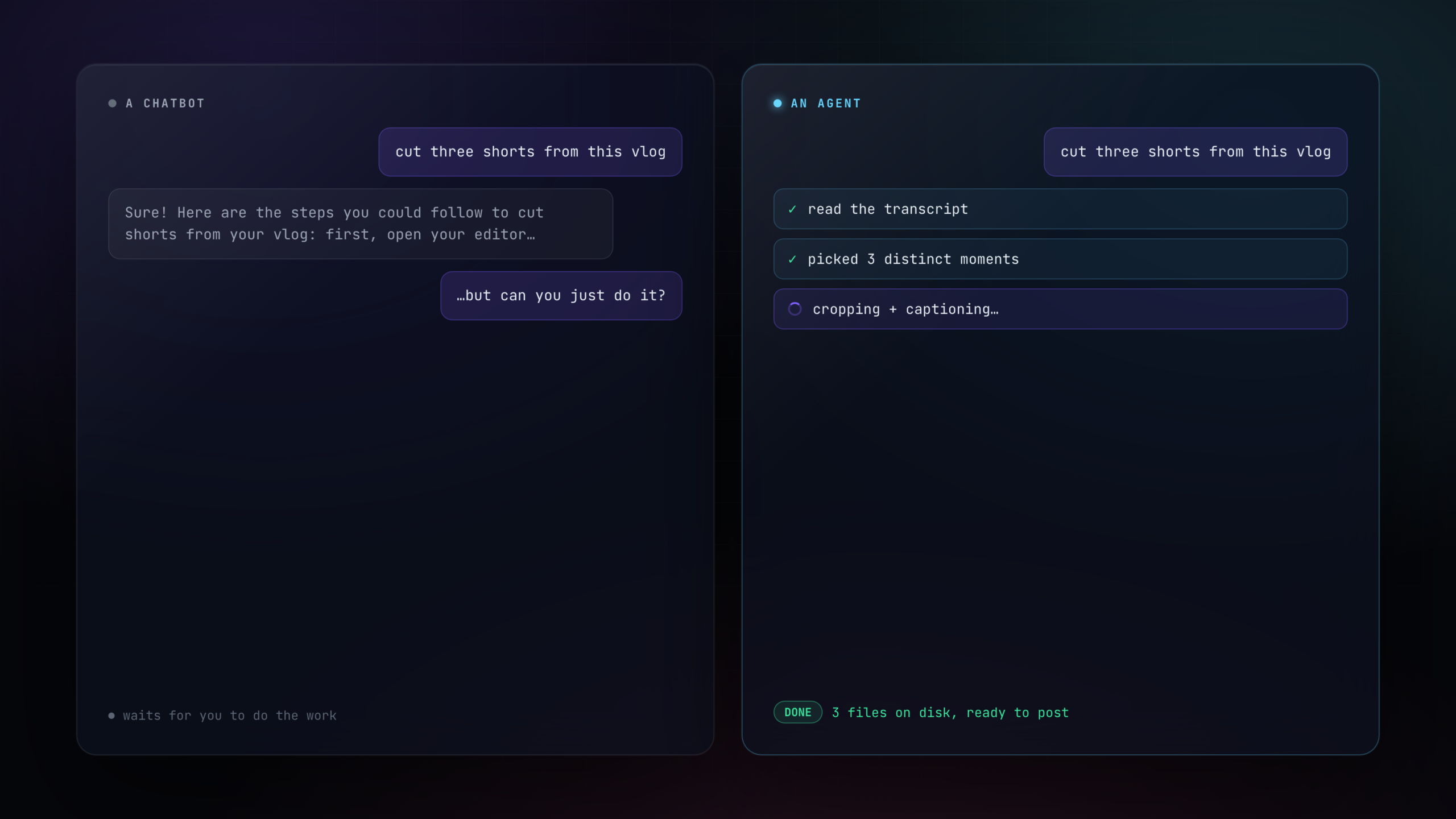
Split comparison: a chatbot replying with a list of steps and waiting, next to an agent checking off tasks and finishing the job on its own Real output
What this is

The difference is who does the work.

An agent reads the goal, makes the calls, runs every step, and hands back the finished thing. These are not demos. Each one below is a system I run.

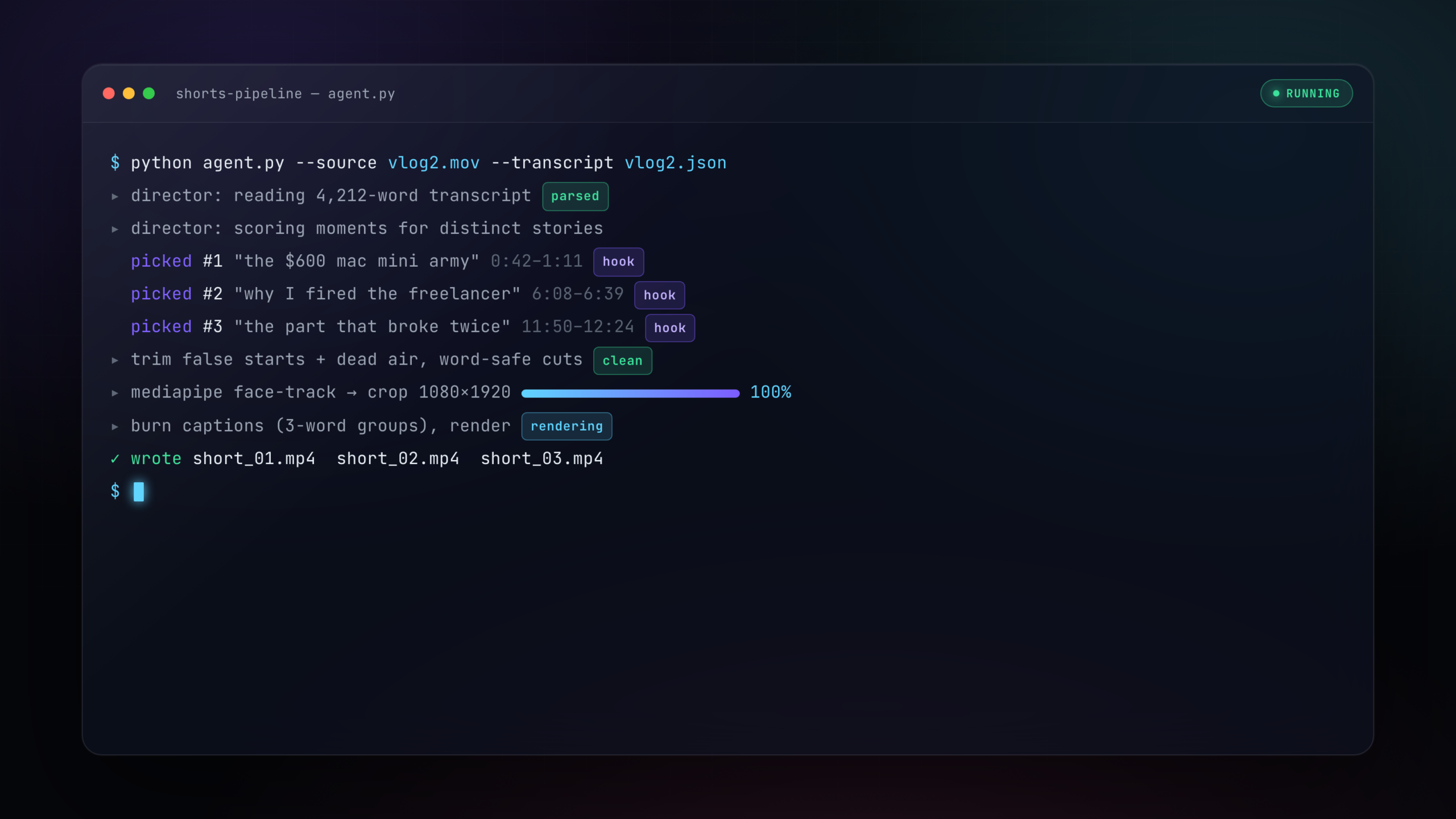
Terminal of the shorts pipeline: the AI director scoring a transcript, picking three distinct clips, face-tracking and cropping to 1080x1920, burning captions, writing three mp4 files
Shorts pipeline

Drops a long vlog in. Gets short clips out.

Point it at one long video and its transcript. It reads the whole thing, picks one to three distinct moments worth clipping, trims my false starts and dead air on word boundaries, tracks my face, crops it vertical, and burns the captions. I open the folder and the clips are done.

  • Picks the moments itself, not random cuts
  • Word-safe trims so captions never break
  • Face-tracked vertical crop, captions burned in
Email sponsor agent

Reads the sponsorship inbox so I don't have to.

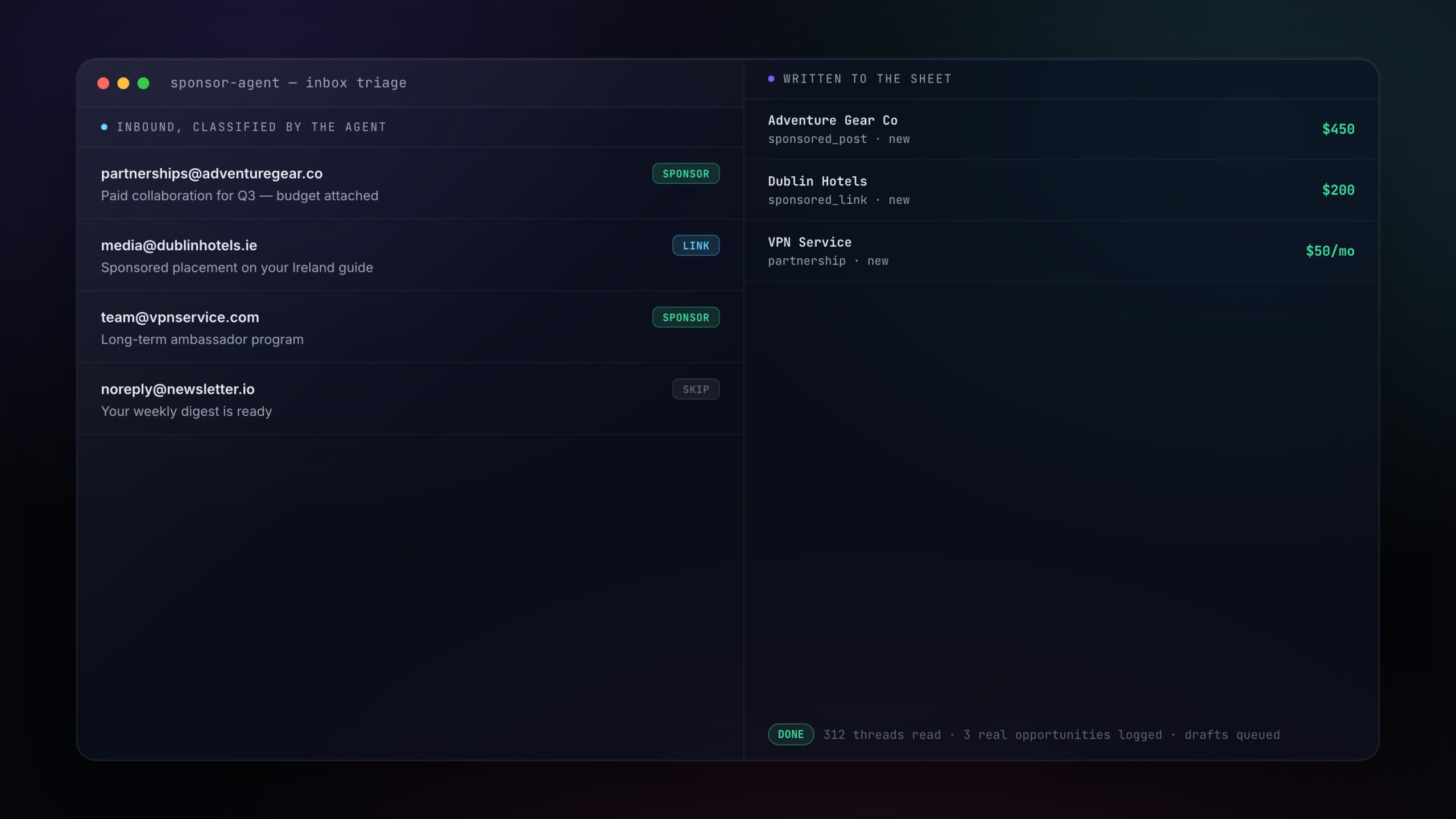
Hundreds of pitches hit my inbox. This agent reads each thread, decides whether it is a real opportunity, pulls out the company, the type, and the money, and logs it to a sheet. It drafts first replies and waits for me to approve before anything sends. The junk never reaches me.
  • Sorts real offers from newsletters and spam
  • Logs company, deal type, and value to a sheet
  • Drafts replies, sends only what I approve
Two-pane sponsor agent: inbound emails on the left classified as sponsor, link, or skip, and the right pane showing real opportunities written to a sheet with company, type, and value
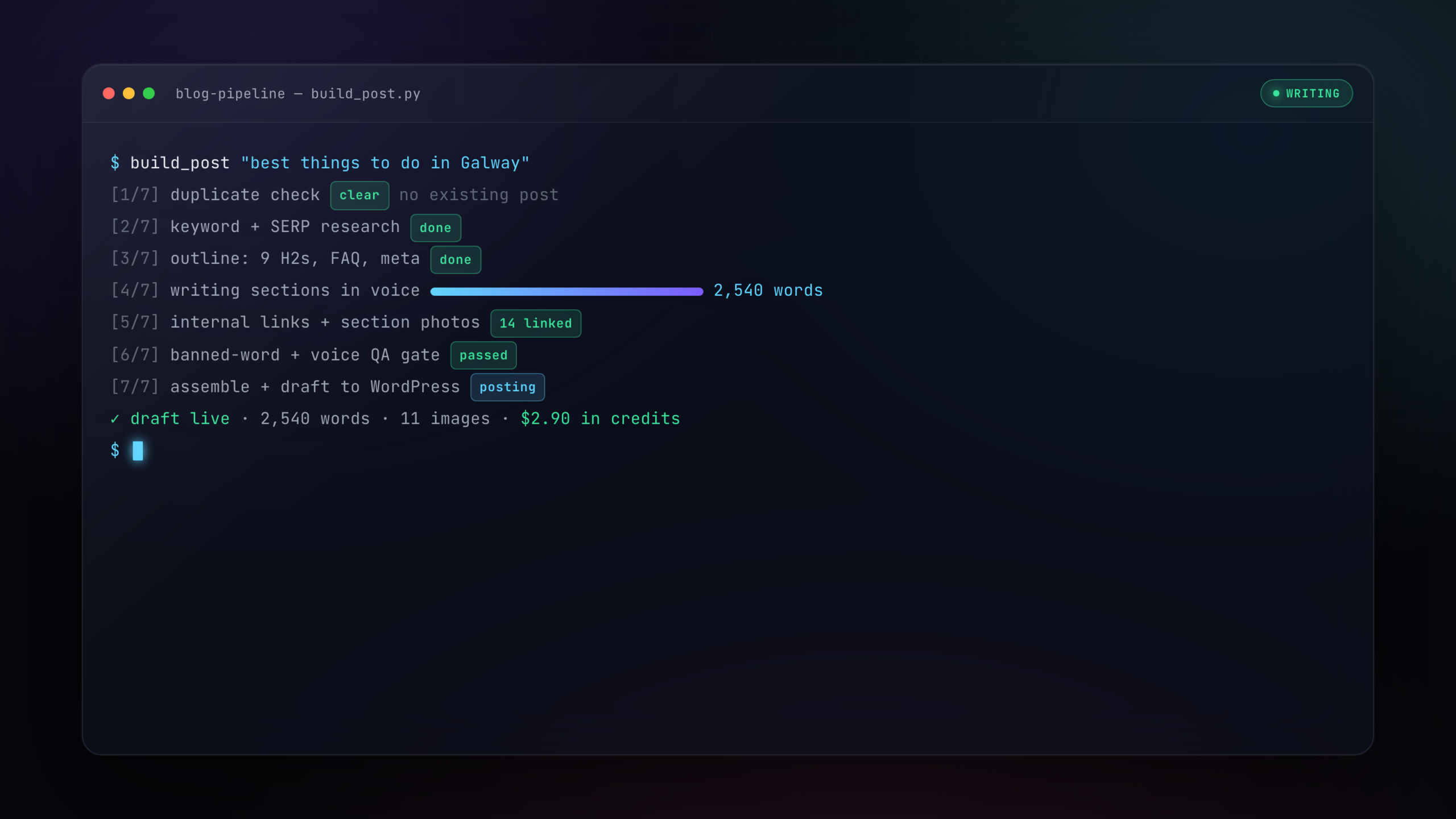
Terminal of the blog pipeline running seven steps: duplicate check, SERP research, outline, writing in voice, internal links and photos, a banned-word QA gate, and posting a draft for about three dollars in credits
Blog pipeline

Writes a full, structured post end to end.

Give it a topic. It checks I have not covered it, researches the search results, builds an outline, writes every section in my voice, adds internal links and photos, runs it through a writing-quality gate, and saves a draft to WordPress. A complete post for a few dollars in AI credits.

  • Research, outline, draft, links, and images
  • Runs through a voice and banned-word gate
  • Lands as a draft for a few dollars in credits
How it works

You ask. It does.

01

You describe the job

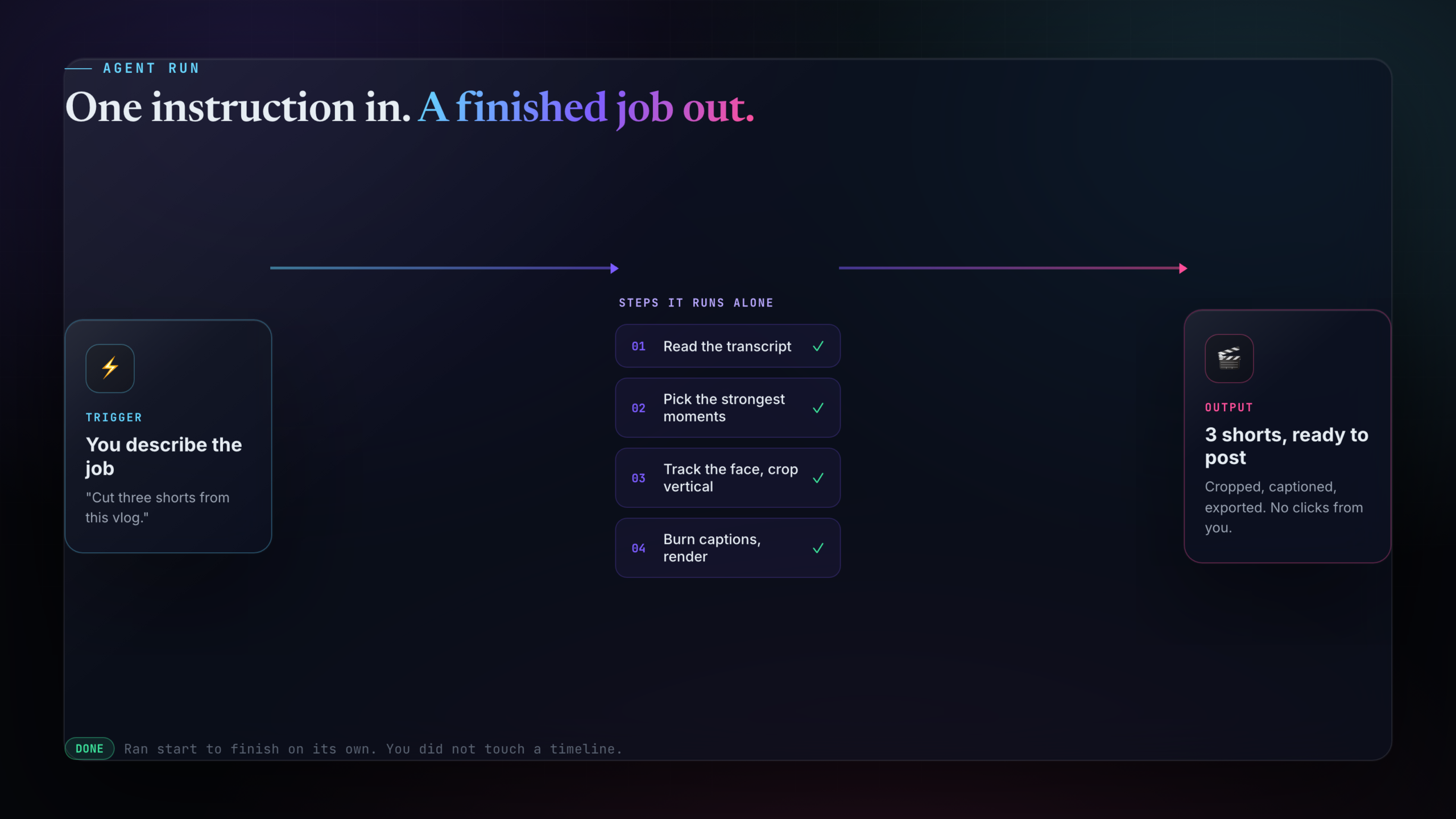
Tell it what you want done in plain words. "Cut three shorts from this vlog." "Sort my sponsor inbox." That is the whole instruction.

02

The agent runs the pipeline

It reads the goal, makes the decisions, and runs every step itself. No clicking through menus, no babysitting it between steps.

03

You get the finished output

Clips on disk. Opportunities in a sheet. A draft post in WordPress. The done thing is waiting for you, not a list of steps to go do.

Real runs

Real agents. Real output.

Every screen here is one of my own agents doing the actual job. No mockups of features that do not exist.
Agent flow diagram: trigger to steps to output
Shorts pipeline run
Email sponsor agent triage
Post Studio scheduling one short to four platforms
Blog pipeline writing a post
Chatbot versus agent
Why it's different

Not a chatbot with extra steps.

Most AI tools answer questions. These finish jobs and hand back the result.

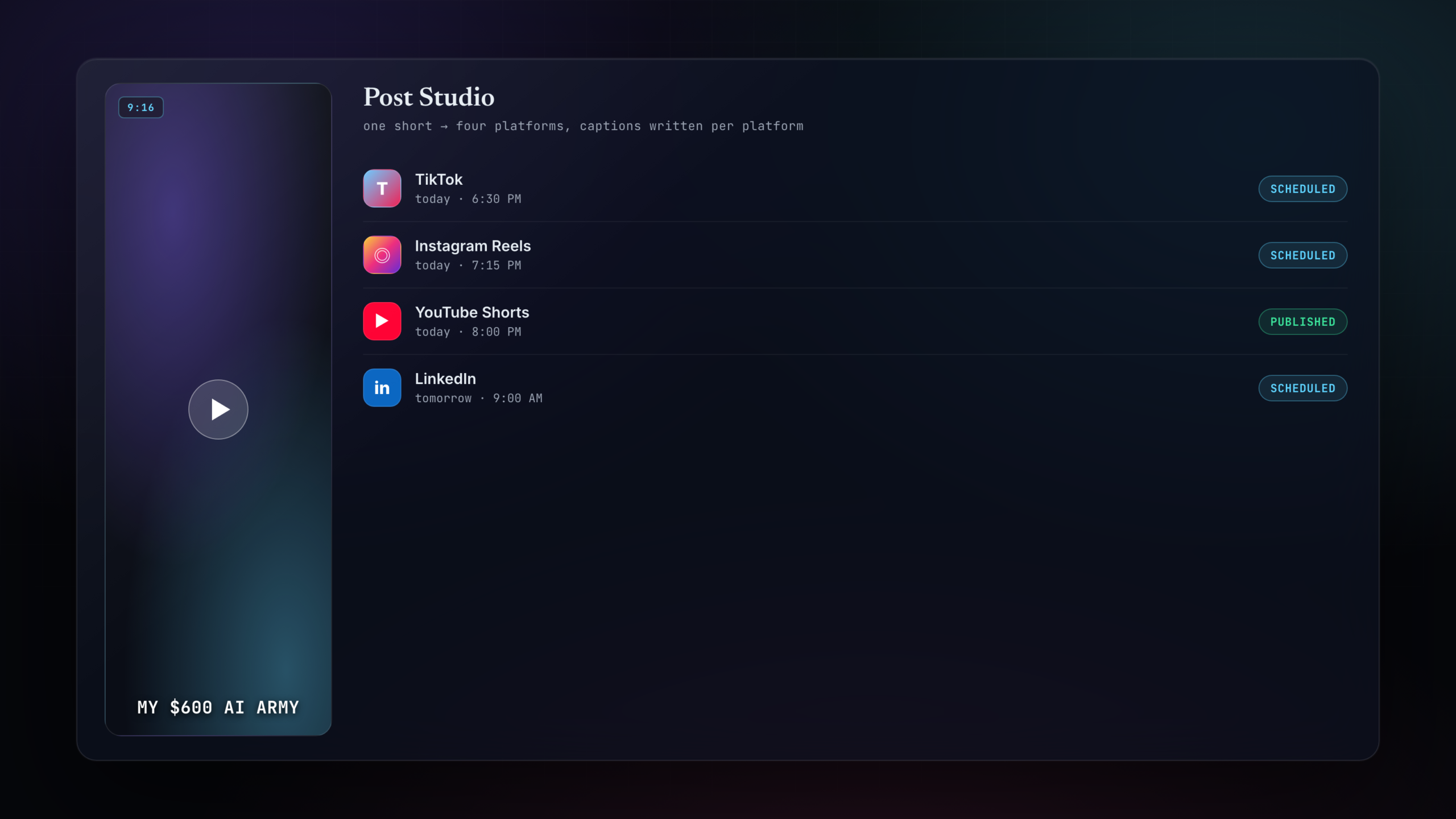
Post Studio: a vertical short on the left, and on the right TikTok, Instagram Reels, YouTube Shorts, and LinkedIn each scheduled or published with their own caption and time
Post Studio

Takes one clip all the way to four platforms.

A finished short is only half the job. Post Studio writes a caption tuned to each platform, schedules the post, and publishes it to TikTok, Instagram, YouTube, and LinkedIn. One video in, four posts out, without me opening four apps.

  • A caption written per platform, not copy-pasted
  • Schedules and publishes to four places
  • Review and approve before anything goes live
Built by someone using them daily

I built these to do my own work.

I run a content business and I was drowning in the repeatable parts: clipping, email, posts, scheduling. So I built agents to do them, with AI and no hand-written code. They run my real work now. The plan is to open them up so you can point them at yours.

  • Built by a creator, for creators
  • Made with AI and zero hand-written code
  • Documented start to finish on YouTube
Agent flow diagram: one instruction triggers a chain of steps the agent runs alone, ending in a finished output with no clicks from the user
4
Agents running my work
0
Lines of code I write
End to end
You ask, it finishes
Beta
Opening to the list

The difference between an agent and a chatbot is simple. One waits for you. The other goes and does the job.

Join the waitlist

Get on the waitlist.

The agents run my own work today. I'm opening them to a small list first. Get on it and I'll email you the moment you can point one at your work.

You're on the list. I'll email you the moment it opens.
No spam. One email when it opens. Unsubscribe anytime.
Questions

Straight answers. No fine print.

A chatbot answers and waits for you to act. An agent takes the goal and does the work itself, running every step and handing back the finished result. You describe the job once instead of doing it.
Real. The shorts pipeline, the email sponsor agent, the blog pipeline, and Post Studio all run my own work right now. The page shows them doing the actual job.
No. You describe what you want in plain words and the agent runs the pipeline. I built all of these with AI and never wrote a line of code myself.
Right now they run my work. The plan is to open them so you can point them at yours: your videos, your inbox, your posts. Join the waitlist to be first in.
Pricing is not set while it is in beta. Get on the waitlist and you'll be the first to know, with early access before it goes public.
Soon. The agents work today and I'm opening them to the waitlist first. Get on the list and I'll send you an invite.